
 Scopique
 Scopique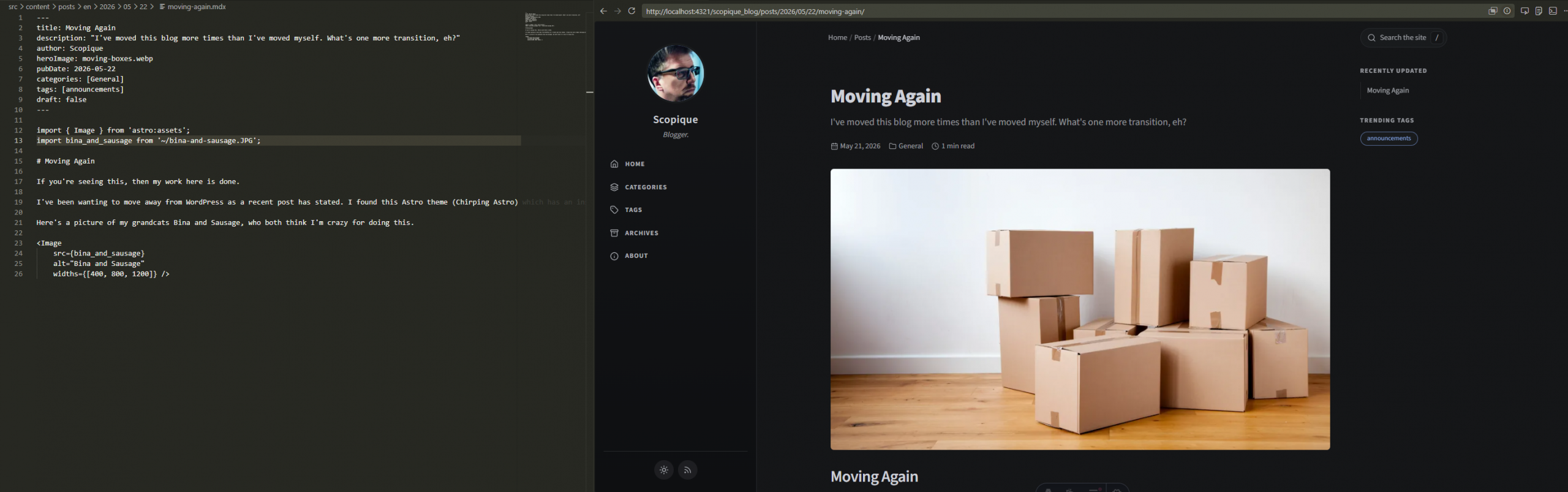
Well, I was wrong. I do have the fortitude to tackle this migration job it seems, and I managed it in only a few hours.
I found the “Chirping Astro” theme through the Astro website’s “theme showcase”. I was looking for something that was pretty simple but not so simple it looked like it just emerged from cryogenic freeze set down in the mid 90’s. Chirping Astro also has a feature that I was looking for that some other Astro themes did not, which is the ability to nest files under the /posts/ directory. Astro uses file-path routing, so rather than just throw all posts into the /posts/ directory as many themes seemed to want me to do, I can create a standard /YYYY/MM/DD format for when I post.
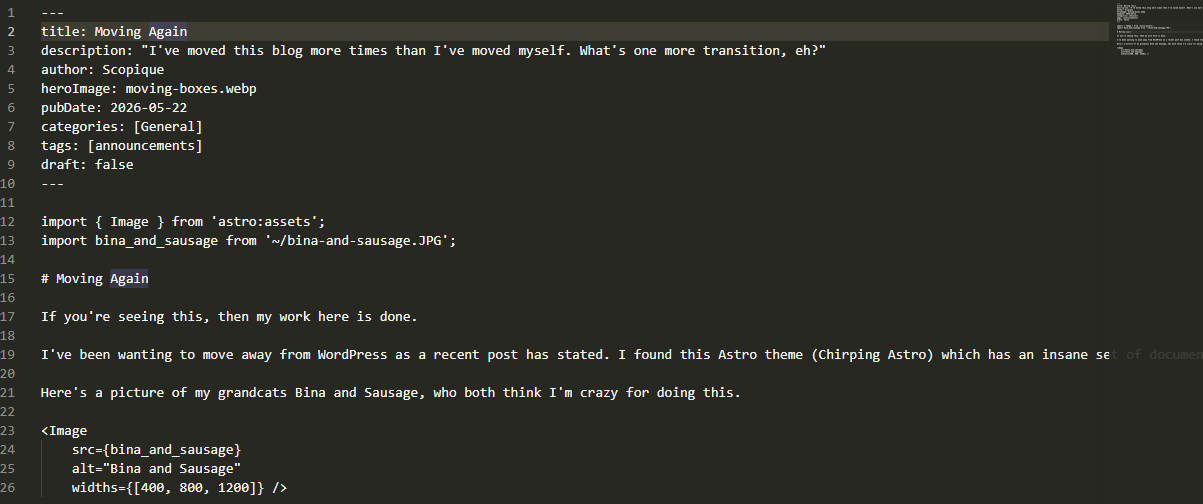
Posts are basic Markdown, although there is the option to use .mdx which is a Markdown variant that allows Astro to inject components that are either compiled or are actionable during runtime. In the screenshot above, the import statements bring in Astro’s Image tag and an image to use with it. I could use a standard Markdown image convention but I’m storing the images elsewhere and climbing out of the post directory and into the image directory results in some pretty hoary path retracing.
Right now the test site (not seen above; that the local dev version running in Visual Studio Code) is running on GitHub Pages and auto-deploys thanks to Actions that come bundled with the theme. This was another reason I chose this theme because I don’t have to do anything except check in my changes and watch them go live. The good news is that GitHub Pages is free. The bad news is that nothing is free, so I’m trying to see if I’d actually be able to use this platform for hosting, what with image uploads and all that, or if I’m going to eventually have to move back to my current host (which is still hosting this site) and pay for a free-form website package.
While I appreciate the “relative freedom” that this approach gives me, it’s obvious that it’s a lot more work than the turnkey simplicity that WordPress provides. I have to include some default frontmatter in every post. I have to remember to create folder structures every day I start a new post. I need to mirror those folders for any images I want to upload, and then remember to manually include images both in the project folder and in the Markdown using — ugh — manual inclusion. No more drag and drop for me. I hope I don’t run into a hard cap at GHPages for a while, though, but I expect my image budget to eventually blow through whatever it might be. The upside is that I can work on the post and preview it locally in VSC while writing it thanks to hot-reloading which is something WordPress doesn’t do. And I have everything stored in a GitHub repo, which facilitates deployment but, more importantly, is my new content backup system. If an when GH Pages kicks me out, I should be able to find another platform which can receive deployments from the repo, and never miss a beat.
I am going to continue to write here, but I will also be copying this content over to the new site. I need to see what it feels like to write an actual post over there, complete with image management and all of the frontmatter hoops I have to jump through. Right now, the domain is staying put; I might, however, activate “blog.scopique.com” to direct to the new site, just to get something other than the default GH Pages URL in place.
You can see this post on the new site at https://scopique.github.io/scopique_blog/posts/2026/05/22/working-as-intended/



1 Comment
Nimgimli
May 22, 2026 - 8:08 pmSuper cool!! Please keep sharing your experiences!!!
Comments are closed.